


SketchUp can be used as BIM tool?
Debarati Nath
Nearly 11 years ago Google changed the world of 3D modeling by introducing SketchUp. Initially this 3D program was designed with ease of use in mind, denoted by its tagline ‘3D for everyone’. Google and the developer of this award winning 3D software give freedom to the professional designers to draw the way they want without pen and paper in a simple and elegant interface. As the time passes, many new attributes are added in its various versions. From SketchUp 1 to SketchUp 8, it has come a long way. And sometimes the way has mingled with BIM technology.
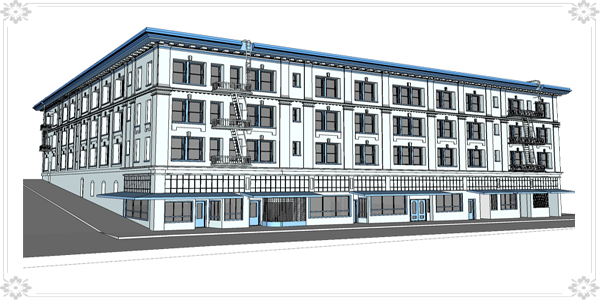
After getting into the discussion we have to know what BIM is first. BIM or Building Information Modeling is not a software, it is a technology rather you say a process. BIM is a process of generating and managing building data during its life cycle. It uses 3D real time dynamic building modeling software to increase productivity in building design and construction. BIM covers geometry, spatial relationships, light analysis, geographic information, quatities and propererties of building components like manufacturers’ details. Now the question is that is SketchUp can be used as a BIM tool. There are various BIM software like Revit, AutoCAD, ArchiCAD which has much more functionality than SketchUp.
 |
Now the point is that, SketchUp too use for building models and sharing information. Also it takes some extra steps to convert the data into usable information for the BIM software. But BIM is not the database itself. It is the graphical representation of the database. It manages the data into the database. In compare to the Revit and ArchiCAD which are not leveraging that data within their own environments SketchUp are not leveraged fully in those other BIM programs. A reason of the difficulty faced in Building Information Modeling is that the IFC programs do not always have the appropriate tool to manipulate the data.
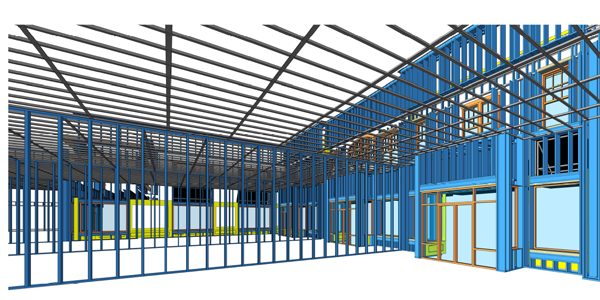
But now many companies like Turner Construction Co. has taken a software agonistic approach to its BIM strategy which is an effort to assure it never constrained by tradition or precedence within an industry that is rapidly changing. And it is made clear in the deployment of the SketchUp Pro. Turner Construction will use SketchUp and its platform as a part of the ‘digital toolbox’ to provide BIM related services on projects worldwide. It seems that SketchUp fits fantastically Turner’s philosophy given the product’s ability to scale up and down based on the needs of the client. Perhaps most aligned with this strategy is the fact it can be used by different people at the company, including managers and field superintendents.
 |
SketchUp is one of the best tool for such tasks as conceptual ‘what if’ scenario cost estimating analysis, building system constructability studies, or whole building and site models for sequencing and schedule analysis and work in place monitoring during construction. You can tell that SketchUp is one of the most popular tools with designers during the early phase of a project but not for the post production. It is especially useful in every design will start looking at energy models before even designing the building. SketchUp makes possible to use everything from paper and pencil, Excel, Google SketchUp, web based BIM tools and model servers to create and interact in the BIM. Google SketchUp and BIM tool that provide the ability to undertake early stage performance analysis on the architect’s model and then bring the model forward into a more detailed analysis environment. Some performance analysis plugins are there to support the BIM aspects of SketchUp.
We can say that SketchUp has the full potentiality to become a full fledged BIM tool if supported by some plugins in future. Yes, SketchUp is ideal for BIM process but not a BIM tool in present.
 |


- Sponsored Plugins

- Cover Story
-
 SketchUp Can Help You Win Interior..
 -
Best Laptops for SketchUp
-
How to Resize Textures and Materials..
-
Discovering SketchUp 2020
-
Line Rendering with SketchUp and VRay
-
Pushing The Boundary with architectural
-
Trimble Visiting Professionals Program
-
Diagonal Tile Planning in SketchUp
-
Highlights of some amazing 3D Printed
-
Review of a new SketchUp Guide
- Sketchup Resources
-
SKP for iphone/ipad
-
SKP for terrain modeling
-
Pool Water In Vray Sketchup
-
Rendering Optimization In Vray Sketchup
-
Background Modification In sketchup
-
Grass Making with sketchup fur plugin
-
Landscape designing in Sketchup
-
Apply styles with sketchup
-
Bedroom Making with sketchup
-
Review of Rendering Software
-
Enhancing rendering for 3d modeling
-
The combination of sketchup
-
Exterior Night Scene rendering with vray