


Some useful sketchup tips to learn how to draw a sphere with sketchup
Rajib Dey : Editor-in-chief
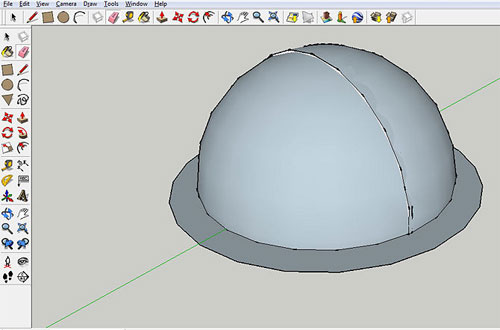
In order to draw a cone as well as sphere, one has to familiar with various sketchup tools and attributes. For drawing a sphere, one should be well versed with the tools like the Circle tool, the Select tool, the Follow-Me tool, the Eraser tool, Inference and their applications.
One should abide by the following sketchup tips which are considered as the most convenient ways to draw a sphere efficiently:-
- Start with a circle. At first draw a circle (according to the size of desired sphere) on the ground plane in one axis on the basis. Use the circle as the path for sketching the sphere.
- Shift the cursor to the origin and until it is snapped to the origin.
- Now shift the cursor up toward the blue axis (on top of the circle on the ground plane). The cursor will be converted to green or red.
- In order to lock the circle tool toward the green or red inference path. just simultaneously push & hold the shift key.
- Sketch a lesser circle, as compared to the first one, at a 90 degree angle with the circle on the ground plane (it characterizes the profile of the sphere).
- Choose the perimeter of the circle on the ground plane. It should be the path.
- Opt for the Follow-Me tool.
- Click on the profile of the sphere and the sphere will be produced smoothly.
- Now take away the circle on the ground plane.
Watch the following live sketchup video to streamline the process.

- Sponsored Plugins


- Sponsored Plugins

- Cover Story
-
 SketchUp Can Help You Win Interior..
 -
Best Laptops for SketchUp
-
How to Resize Textures and Materials..
-
Discovering SketchUp 2020
-
Line Rendering with SketchUp and VRay
-
Pushing The Boundary with architectural
-
Trimble Visiting Professionals Program
-
Diagonal Tile Planning in SketchUp
-
Highlights of some amazing 3D Printed
-
Review of a new SketchUp Guide
- Sketchup Resources
-
SKP for iphone/ipad
-
SKP for terrain modeling
-
Pool Water In Vray Sketchup
-
Rendering Optimization In Vray Sketchup
-
Background Modification In sketchup
-
Grass Making with sketchup fur plugin
-
Landscape designing in Sketchup
-
Apply styles with sketchup
-
Bedroom Making with sketchup
-
Review of Rendering Software
-
Enhancing rendering for 3d modeling
-
The combination of sketchup
-
Exterior Night Scene rendering with vray